Easy 3D Adding Puzzles: A KDP Practice File for Sharpening Your Design Eye
Let’s be honest, the journey from a creative idea to a polished, sellable product is rarely a straight line. It’s filled with drafts, mockups, and practice runs. For anyone diving into the world of KDP interiors, especially those leaning towards logical games and intricate designs, having a reliable practice file isn’t just helpful—it’s essential. This is where a resource like the Easy 3D Adding Puzzles KDP Practice File comes into play, offering more than just a set of puzzles. It’s a sandbox for understanding layout, visual hierarchy, and the subtle art of user experience, all within the specific constraints of an 8.5 x 8.5 inch format.
Beyond the Puzzle Grid: A Playground for Visual Consistency
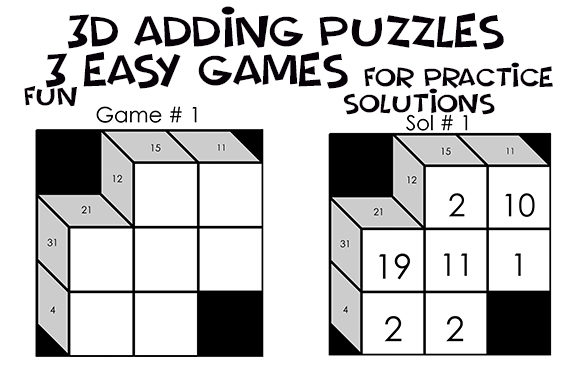
At first glance, the file presents itself as a collection of Kakuro-style puzzles, complete with clues, solution areas, and a clean white background. But for a designer or content creator, its true value lies in the design challenges it presents. The fixed dimensions mimic a real KDP interior page, forcing you to think within those boundaries. The need to manually renumber games or adjust fonts in the PowerPoint master slide isn’t a limitation; it’s a hands-on lesson in maintaining visual consistency across a multi-page document. Every time you tweak a number’s position after a font change, you’re practicing the meticulous alignment that separates amateur layouts from professional publications. This kind of practice directly translates to creating cohesive brand assets, whether for a logo, a series of social media graphics, or the interior of a planner you’re designing.
From Puzzle Solving to Design Problem-Solving
The structure of a Kakuro puzzle is inherently about relationships—the "across" and "down" clues that guide the solver. This mirrors the core of good design: establishing clear relationships between elements to guide the viewer’s eye. Working with this practice file, you learn to balance text (the clues) with negative space (the empty cells), ensuring readability without clutter. This is the same principle you apply when choosing a font pairing for a website or laying out a brochure. A premium font with strong legibility is crucial, but it’s the space around it that gives it power. The file’s inclusion of solution numbers ranging from 1 to 20 also offers a subtle lesson in scale and proportion—how numbers of different values interact within the same grid space is a microcosm of how headlines and body text should relate on a page.
Practical Applications for the Modern Creative
So, how does practicing with these puzzles actually benefit your broader projects? The applications are surprisingly wide-ranging. Consider these real-world scenarios where the skills honed here are directly applicable:
- Packaging Design: The need for clear, unambiguous instructions on a puzzle grid is identical to the clarity required in product packaging. You’re designing for immediate comprehension.
- Editorial Layouts: Managing a complex grid with multiple data points (clues and solutions) trains you for magazine or report layouts where text, images, and pull quotes must coexist harmoniously.
- Digital Products & Marketing Assets: The process of exporting and preparing files—understanding why a JPG might have a white background you can’t remove and planning accordingly—is a fundamental skill for creating digital downloads, email graphics, or web banners.
- Brand Identity Systems: Consistency is king. If you can maintain a uniform look across 20 different puzzle pages, you can certainly apply that discipline to a logo suite, business cards, and social media templates for a client.
Typography in the Details: A Master Class in Restraint
One of the most practical pieces of advice embedded in this resource is the warning about changing fonts via the Master Slide. The numbers won’t reposition themselves automatically. This is a golden rule of typography and layout: automation has its limits. It pushes you to develop a manual, detail-oriented eye. You start considering not just the font style—whether a clean sans serif for modern clarity or a more distinctive display font for character—but its metrics, its kerning, and its precise placement. This is the level of scrutiny needed for professional logo design or creating a custom typeface for a brand. The file essentially forces you to interact with typography as a spatial element, not just a written one, which is the hallmark of modern, effective design thinking.
Building Your Creative Toolkit, One Practice Page at a Time
Think of this Easy 3D Adding Puzzles file not as a finished product, but as a versatile training tool. It’s a bridge between theoretical design knowledge and the practical, sometimes frustrating, realities of production. It teaches you to work within specs, to prioritize clarity, and to sweat the small stuff—because in design, the small stuff is everything. Whether you’re a hobbyist creating a gift book, a small business owner developing branded activity pads, or a designer expanding your skill set into publishing, engaging with these puzzles builds a foundational discipline. It reinforces that great design is less about flashy effects and more about thoughtful structure, consistent execution, and an unwavering focus on the end user’s experience. In this case, that user is both the puzzle solver and, more importantly for you, the designer learning to build better, more professional work from the ground up.